Deleting Mail form Horde webmail

Deleting Mail form Horde webmail

Deleting Mail form Horde webmail

Deleting emails from horde webmail individually.

Step: 01


1. For deleting emails from horde webmail at first login to the webmail by http://webmail.yourdomainname.com link to access the mail in online and give the respective user id and password in required field.

Step: 02

2. Click on the Mail tab and select the folder that contains the large number of messages, from where we can delete the specific emails which are unwanted to us by selecting the check box next to the emails.

3. Now select the Delete option for temporary delete the selected emails as mentioned in picture.

Step: 03


4. And for the permanently delete there is a "Purge Deleted" option on the right hand side of the webmail.


Deleting all emails from horde webmail at a time.

Step: 01
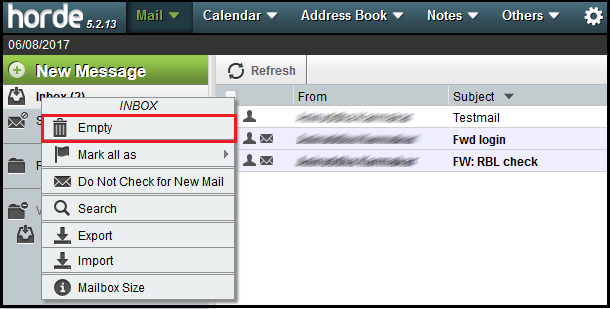


1. For deleting all emails from horde webmail at a time, first you will need to right click on the INBOX folder and click on Empty button from the menu.

Step: 02


2. Now you will receive a notification that you are deleting all messages in the Inbox. To confirm, please click on OK.


    • Related Articles

    • Automatically purge messages from the Spam folders on Horde Webmail

      Automatically purge messages from the Spam folders on Horde Webmail Step 1: Follow the steps to delete spam emails automatically from Horde Webmail 1. Visit the URL http://webmail.domain_name.com and login into horde webmail. 2. Hover on settings ...
    • Deleting emails from Horde Webmail

      Deleting emails from Horde Webmail Step 1: Follow the steps to delete selected emails permanently 1. Visit the URL http://<webmail.domain_name.com> and login into horde webmail. 2. Click on the Mail tab and select the folder from where you want to ...
    • Email Whitelist or Blacklist in Horde Webmail

      Email Whitelist or Blacklist in Horde Webmail Step 1: Login with your email address and password in webmail.<domain-name>. Step 2: Go to the spam folder, select the email. Step 3: Right click on the email and select the Whitelist or Blacklist option.
    • Changing E-mail password through webmail (Horde)

      Changing E-mail password through webmail (Horde) Step 1: Follow the steps to change password of your email address from Horde webmail 1. Visit the URL http://webmail.<domain_name> or https://webmail.<domain_name> and login into horde mail. 2. Hover ...
    • How to mark a particular mail as spam/not as a spam in Zimbra Webmail

      1. Login to the Zimbra Webmail using respective username and password. 2. Select on the particular email that you want to mark as a spam, right click on that mail and click on “Mark as Spam”, as shown on the below figure. 3. After clicking “Mark as ...