How to add custom Port on IIS Manager for specific website
1. Open Internet Information Services (IIS) Manager.
2. Select the Web site that you wish to configure.
3. In the Action pane, click Bindings.

4. Click Add to add a new site binding.

5. Now add the custom port you want to use and click OK.

Now you have to allow the custom port for public access from windows firewall.
1. Click Start→Administrative Tools→Windows Firewall with Advanced Security
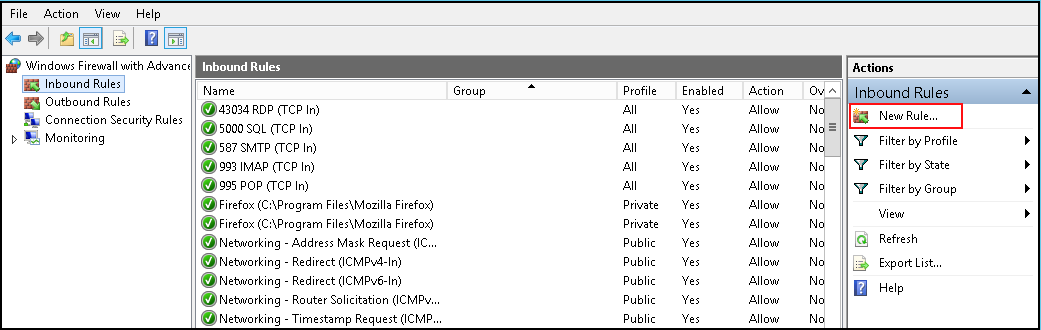
2. Then Click on Inbound rule and then Click on New Rule.
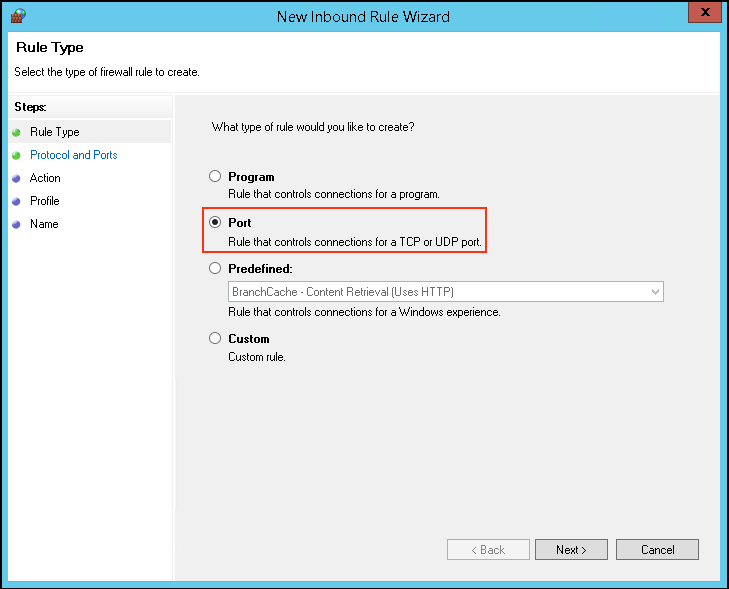
3. Move the radio button to port and click Next.
4. Then Give The New Port Number which you want to assign and click Next.

5. Keep The Default settings(ie Allow The connection)and click Next.

6. Keep The Default settings and click Next.

7. Give the rule a name relavent to your website for further tracking and click Finish button.

All set, now you can access your website by using IP and port number.
Related Articles
Plesk Custom File Extension Support
Plesk Custom File Extension Support Issue: Problem with the ".htaccess" file and the "include" function, resulting in the top panel and footer not appearing on the website as the include files are not processed in the web server Step 1: Navigate to ...How to Add Website in IIS
Steps to follow to add a website in IIS Steps to configured by selecting a folder in Windows Explorer and adding the permission identity to the folder's Access Control List (ACL). Open Windows Explorer > Select the directory under (eg: C:\website) > ...How to download website backup using plesk control panel
Steps to download website backup using Plesk Step 1: At first login to the Plesk control panel and click on Website & Domains then select the domain for which you want to take the backup and then go to file manager. Step 2: Select the folder (or ...How to configure IIS to access website using IP address?
Steps to follow to configure IIS to access a website via IP address. Add a Binding in IIS Login into your Window server via Remote Desktop. Go to Start → Administrative Tools → Internet Information Services (IIS) Manager. In the Connections pane of ...Add applications through the application manager
Add applications through the application manager Description : This functions as a local repository and an apps management tool. The repository functionality allows you to add, update, and remove app packages. Using the management capabilities, you ...