How to reset the email address password and delete email address in Zimbra
1. Change Password
2. Delete Email Address
Change Password
1. Login to the Zimbra Admin Panel. Type admin credentials to the textbox and click on ‘Sign In’.

2. Search the email address that you want to reset the password. As shown on the figure below.

3. Right click on the email address that you want to reset the password. And click on 'Change Password' option, as shown on figure below.

4. Now choose the password and confirm the password as shown on the figure below. After that click on OK.

Delete Email Address
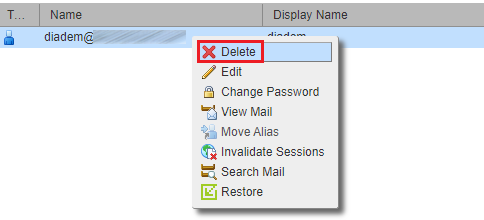
Right click on the email address and click on the delete option to delete the email address as shown below:
Related Articles
Zimbra password reset from webmail
Steps to change zimbra password from webmail Step 1: Login into the Zimbra webmail Step 2: Now click on down-ward triangle > change password Step 3: A password change page will open, now give the current password > give new password > confirm it > ...How to reset email address password from plesk panel
How to reset email address password from Plesk panel Steps for Resetting The Password for Any Email Address Visit the URL http://<your_domain>:8880 or https://<your_domain>:8443 (For SSL) and login Click on the Mail tab and the click on the email ...Manage Zimbra Email Services from Client Portal
Manage Zimbra Email Services from Client Portal Quick Navigation Email Account Email Aliases Distribution Lists Domain Aliases Go To Webmail You need to login into your client account at: https://manage.diadem.in/clientarea.php Enter the email ...Manage Zimbra Email Services from Client Portal
Manage Zimbra Email Services from Client Portal Quick Navigation Email Account Email Aliases Distribution Lists Domain Aliases Go To Webmail You need to login into your client account at: https://manage.diadem.in/clientarea.php Enter the email ...Email id configure on ipad and iphone.
IPad IPhone Zimbra NE incoming and Outgoing Server Details Email id configure on iPad # Step: 01 1. For configuring email id on ipad, please open the iPad and click on the email icon available at the iPad dock. # Step: 02 2. Now croll down and tap on ...