Process to delete all mails from Roundcube webmail
1. Login to the Webmail with respective username and password.

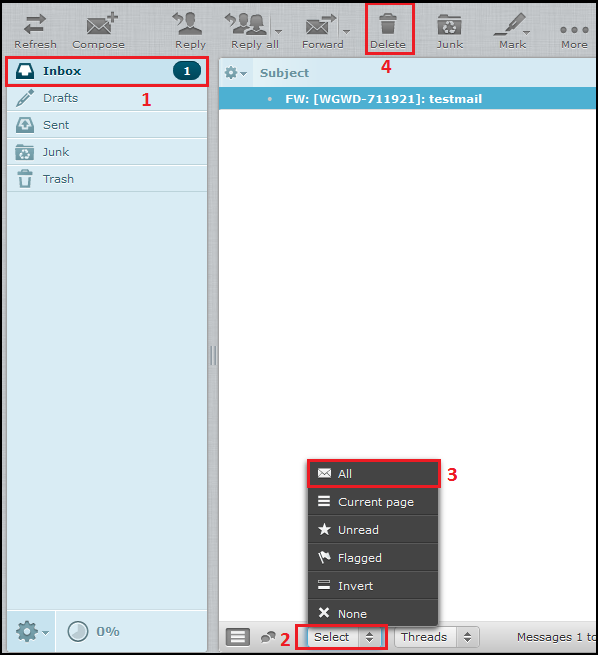
2. Click on “Inbox” and pick “All” from the “Select” dropdown at bottom of the webmail after that click on “Delete” button.
Related Articles
Roundcube Webmail SMTP Error
Unable to send message from Roundcube SMTP Error (-1): Connection to server failed Issue: Roundcube was not working as the letsencrypt ssl had expired , even after renewing SSL it was still not working. Server OS: CentOS 6.1 and Plesk Onyx enabled ...Roundcube Webmail Guide
Login to the Roundcube Webmail Open the URL in the format http://webmail.<yourdomanin.name>/ in your web browser. The site shows the Login screen, which is used to authenticate a user. Please type-in your full email address and password into the ...How to delete bulk mails from Zimbra webmail
How to delete bulk mails from Zimbra webmail 1. Login to webmail.domain_name 2. Search for the particular date in the Date option in the search bar as given below. 3. Then select the Folder option to search for a folder and to delete the mails in ...Automatically purge messages from the Spam folders on Horde Webmail
Automatically purge messages from the Spam folders on Horde Webmail Step 1: Follow the steps to delete spam emails automatically from Horde Webmail 1. Visit the URL http://webmail.domain_name.com and login into horde webmail. 2. Hover on settings ...How to mark a particular mail as spam/not as a spam in Zimbra Webmail
1. Login to the Zimbra Webmail using respective username and password. 2. Select on the particular email that you want to mark as a spam, right click on that mail and click on “Mark as Spam”, as shown on the below figure. 3. After clicking “Mark as ...