Backup and restore MySQL database with Plesk
Backup and restore MySQL database with Plesk
Description: In Plesk, database dumps are created in the SQL format and saved as ZIP archives. If you need to create a dump in another format or to set custom settings for a dump, use the native functionality of DB management tools (phpMyAdmin, phpPgAdmin, or myLittleAdmin).
For taking Backup of MySQL Database, follow the below mentioned steps :-
Step 1: Login To the Plesk control panel.
Step 2: Go to the DB.
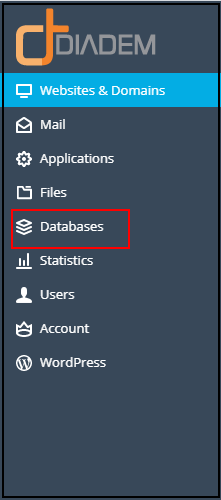
Step 3: Locate the name of the DB you wish to take a backup from the server, click on Export Dump in the db tool panel.
.png)
Step 4: To save a dump in a certain directory on the server, select the directory. The home directory of your subscription is used by default, thgen click on OK to continue.

You will see the success or failure message in the right side of the message box. After the success of the db backup, it will start the download on your local machine.
.png)
For Restoring Backup of MySQL Database, follow the below mentioned steps :-
Step 1: Login To the Plesk control panel.
Step 2: Go to the DB.
.png)
Step 3: Locate the name of the DB you wish to upload or restore the backup from your local machine.-*

Step 4: Then click on Import Dump in the DB tools panel

Step 5: To choose a dump from your local computer in select Upload and click Browse. Then select a DB backup file and then click ok to upload.

Step 6: Once the dump is selected, then click OK.

Once the upload is completed you will get successfully Import notification.

Related Articles
Plesk Subscription-level daily schedule backup
Plesk Subscription-level daily schedule backup How to schedule the backup How to restore the backup How to schedule the backup Step 1: Go to Subscriptions > example.com > Backup & Restore > Schedule. Step 2: Check the Activate backup task checkbox ...Plesk database missing in subscription
Check and Move database between different subscription Issue: Database is not showing under the original Subscription from Plesk Panel Observation: With the following command it is found under which subscription the database is currently exist. ( ...cPanel Backup Job monitoring
Cpanel Backup Job monitoring Reference KB on Cpanel Backup log location: https://support.cpanel.net/hc/en-us/articles/4402165344535-Where-are-the-cPanel-Backup-logs Reference KB on Cpanel backup on locally mounted remote filesystem: ...Plesk services logs and configuration files
Plesk services logs and configuration files Plesk Logs Error log: /var/log/sw-cp-server/error_log Access log: /var/log/plesk/httpsd_access_log Panel log: /var/log/plesk/panel.log Configuration PHP config on RHEL-based: ...MySql Backup and Restore using SQLBackupAndFTP
Note : Free version can take the backup of only two database. Download the latest version of SQLBackupAndFTP from below mentioned url :- URL : https://sqlbackupandftp.com/download Once SQLBackupAndFTP gets downloaded make sure system has latest ...