Diadem MXThunder Antispam Filter Overview
Diadem MXThunder Antispam Filter Overview
Mxthunder is a premium cloud based antispam and antivirus solutions that works out of the box,
offer full control, and is seamlessly integrated into existing email infrastructure.
If you have an existing subscription, please login at the below URL:
Antispam URL: https://diademtech.mxsnap.com/
User Name: yourdomain.com
Password: (as provided during signup)
Shared Quarantine
To check all the Quarantine emails Quarantine > Shared Quarantine
.png)
To manage the Quarantine emails
.png)
Hover on the email subject to get the options for viewing, blocking and approving the sender
____________________________________________________________________________________________________________________________________________________________
Clean mail
To check all the Clean mail Quarantine > Clean mail
.png)
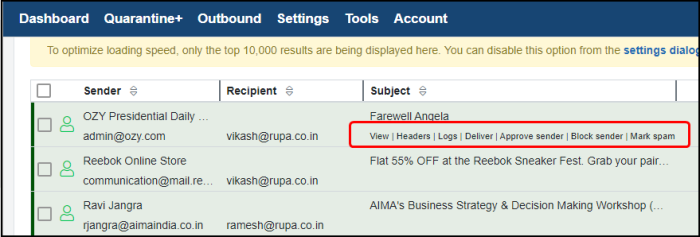
On the email subject to get the options for viewing, blocking and approving the sender.
_________________________________________________________________________________________________________________________________________________________________
WhiteList and BlackList Senders
For Approved sender need to click on Settings > Approved senders
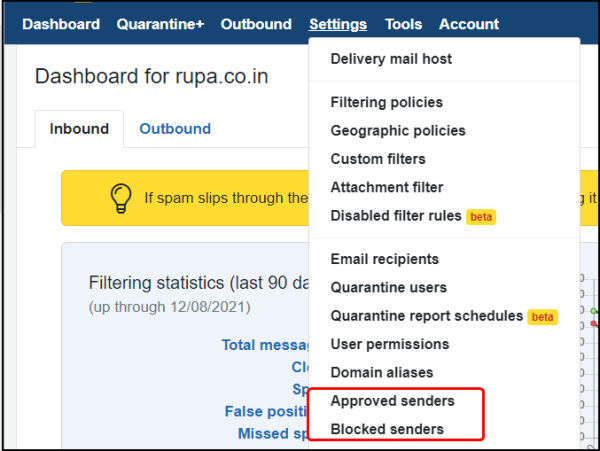
Now click on Add
.png)
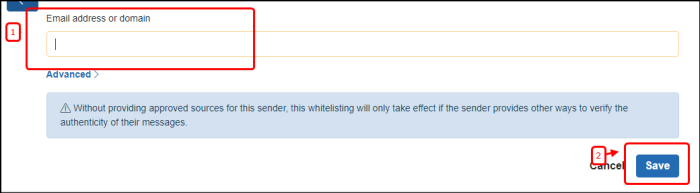
Enter the Email address or domain name and save it.
___________________________________________________________________________________________________________________________________________________
For Blocked sender click on Settings > Blocked senders
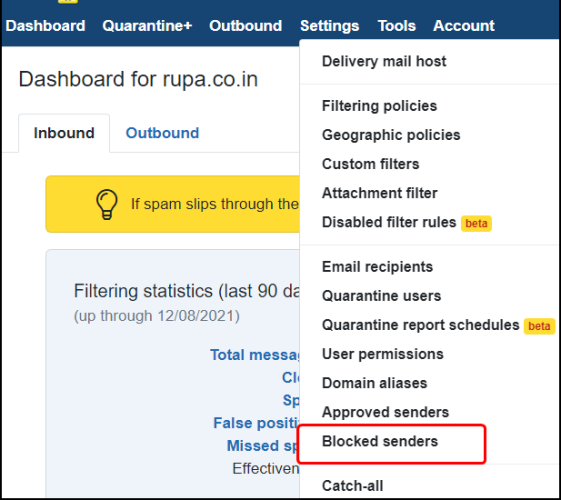
Click on Add
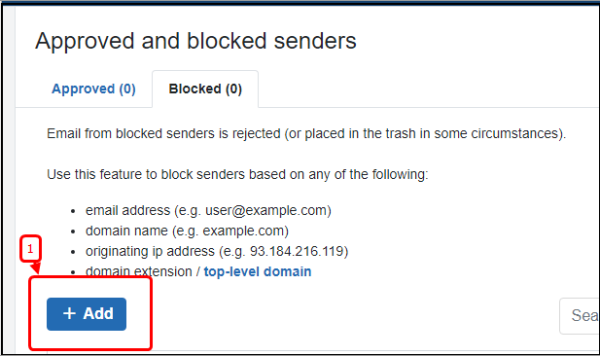
Input the Email address or domain name and click on Add blocked senders
bl2.png)
Spam Training
To mark any mail as a spam mail
Quarantine > Clean Quarantine > click on Mark spam
.png)
To clean the spam mail follow the steps below.
Quarantine > Shared Quarantine > click on View
.png)
Click on the Mark clean
.png)
Recipient White list
Custom Filter rules that are set to "Always deliver" will override all other filters when there's a match. That includes messages with viruses, spoofed senders, blocked senders, and other Custom Filter rules that are set to "quarantine".
Go to Settings > Custom Filter
.png)
Then create a new filter rule.
.png)
Create custom filter
.png)
The highlighted parameters should be mentioned while creating the filter, where "user@example.com" is the recipient id where the incoming filter will not work and all incoming emails will always be allowed.
Related Articles
Diadem Spamexperts Advanced Antispam Overview
Diadem Spamexperts Advanced Antispam Overview Diadem Spamexperts is a premium cloud based antispam and antivirus solutions that works out of the box, offer full control, and is seamlessly integrated into existing email infrastructure. If you have an ...MSH filter rule: Block all incoming and outgoing emails of Gmail and yahoo from a specific email id.
Download MSH Filter To download and install the Desktop module for MSH filter administration at your local system, Please use below given link. Desktop module for MSH filter download link: ...Email Antispam browser not supported resolution
Email Antispam browser not supported resolution The antispam login page might not open with the following error. Firstly, check if you the URL is http://login.antispamcloud.com/notsupported.php and ensure you are logging to ...Spamexperts Outgoing Spam Filter Settings
Spam Experts Outgoing Spam filters are very effective at blocking a large percentage of outbound spam/viruses, to prevent issues with your network reputation, the spam filter can be monitored and the spammer can be blocked. Configuration in Spam ...Deploying node.js in Diadem Express Cloud
we need to login to the Diadem EC control panel, once logged in we can created a new environment. as shown in the below given picture. I have deployed a basic node.js without any load balancing and sql server, in the above picture I have marked the ...