Email Antispam browser not supported resolution
Email Antispam browser not supported resolution
The antispam login page might not open with the following error.
.png)
In Chrome
Step 1: On your computer, open Chrome.
Step 2: At the top right, click More 

Step 3:Under "Privacy and security," click Site settings.
.png)
Step 4: Click Cookies.

Step 5:From Here you can: Turn on cookies: Next to "Blocked," turn on the switch./ Turn off cookies: Turn off Allow sites to save and read cookie data also enable the feature mentioned in the image.

Firefox
Step 1: Click the Tools menu from the top toolbar.
Step 2: Choose Options.
Step 3: Click the Privacy tab.
Step 4: Under "History" select "Use custom settings for history" from the drop-down menu beside "Firefox will:"
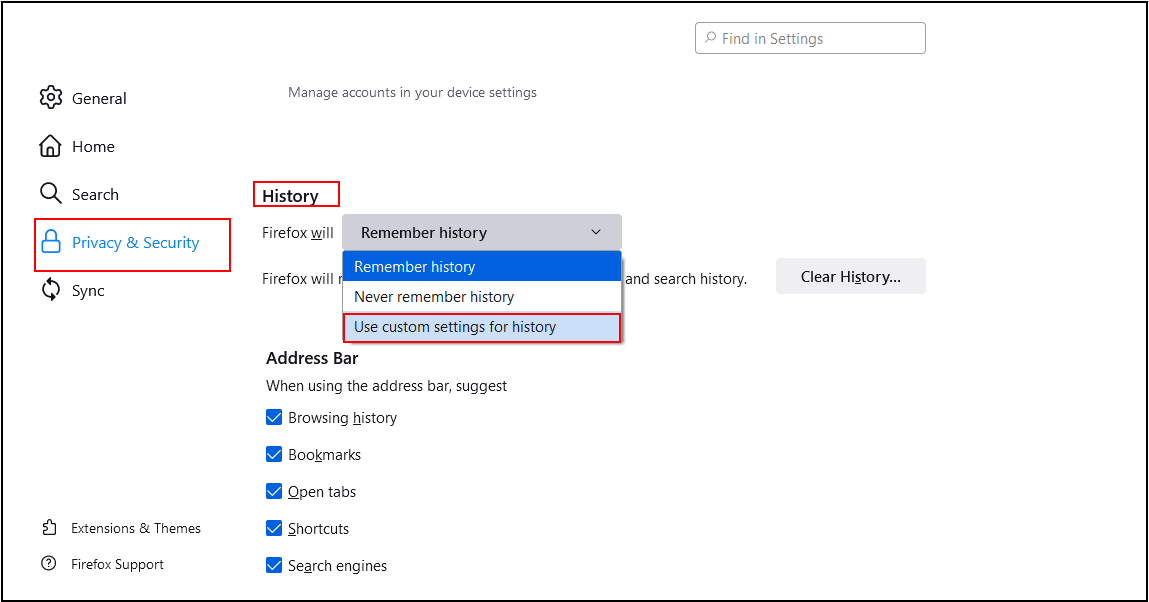
Step 5: Ensure that the checkboxes for "cookies" and are checked.

Step 5: Click OK.
Step 6: Under Cookies and Site Data Check the box as shown in the image.

Note: Once you enable the Cooke on your browser and still issue remains the same then clear the Browser History and check once from Incognito Mode in Chrome and Private Window in Mozilla Firefox
Related Articles
Diadem Spamexperts Advanced Antispam Overview
Diadem Spamexperts Advanced Antispam Overview Diadem Spamexperts is a premium cloud based antispam and antivirus solutions that works out of the box, offer full control, and is seamlessly integrated into existing email infrastructure. If you have an ...Diadem MXThunder Antispam Filter Overview
Diadem MXThunder Antispam Filter Overview Mxthunder is a premium cloud based antispam and antivirus solutions that works out of the box, offer full control, and is seamlessly integrated into existing email infrastructure. If you have an existing ...Spamexperts Outgoing Spam Filter Settings
Spam Experts Outgoing Spam filters are very effective at blocking a large percentage of outbound spam/viruses, to prevent issues with your network reputation, the spam filter can be monitored and the spammer can be blocked. Configuration in Spam ...Outgoing email is blocked in M365
Emails for your user's Microsoft 365 account are blocked and cannot be used for sending or receiving emails. The most common reason for this is that your email address is suspected of sending spam and it's no longer allowed to send an email. ...Server-Wide Email Settings in Plesk
Server-wide Email Settings in Plesk For managing Server Wide Email Settings in Plesk, you may follow the below options once you Login into the Plesk Panel. General options Outgoing mail mode Relay options Turn on limitations on outgoing email ...