How to assign email address to a plan
1. Login to Zimbra Admin Panel.
Login URL: https://<zimbra-server-ip>:7071 or https://<server-hostname>:7071

2. Now search the email address that you want to assign particular COS (Class of Service) or Plan.
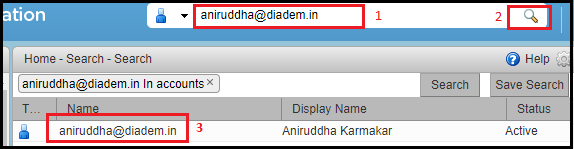
3. Now double click on the email address and select particular plan of the email address under the Account Type section as shown on the screenshot below.

4. Now click on the Save to modify changes.

Related Articles
Email id configure on ipad and iphone.
IPad IPhone Zimbra NE incoming and Outgoing Server Details Email id configure on iPad # Step: 01 1. For configuring email id on ipad, please open the iPad and click on the email icon available at the iPad dock. # Step: 02 2. Now croll down and tap on ...Server-Wide Email Settings in Plesk
Server-wide Email Settings in Plesk For managing Server Wide Email Settings in Plesk, you may follow the below options once you Login into the Plesk Panel. General options Outgoing mail mode Relay options Turn on limitations on outgoing email ...Email Whitelist or Blacklist in Horde Webmail
Email Whitelist or Blacklist in Horde Webmail Step 1: Login with your email address and password in webmail.<domain-name>. Step 2: Go to the spam folder, select the email. Step 3: Right click on the email and select the Whitelist or Blacklist option.Whitelist, Blacklist Email IDs and Bounce options in Plesk Obsidian
How to Email Address Whitelist or Blacklist in Plesk Step 01: Go to the Mail tab on the left panel and click on the email address. Step 02: Click on the Spam Filter tab. Step 03: Enable "Switch on spam filtering for this email address" and expand the ...Outgoing email is blocked in M365
Emails for your user's Microsoft 365 account are blocked and cannot be used for sending or receiving emails. The most common reason for this is that your email address is suspected of sending spam and it's no longer allowed to send an email. ...