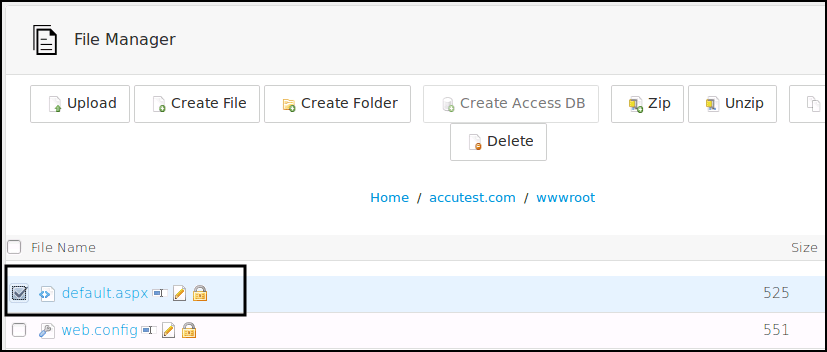
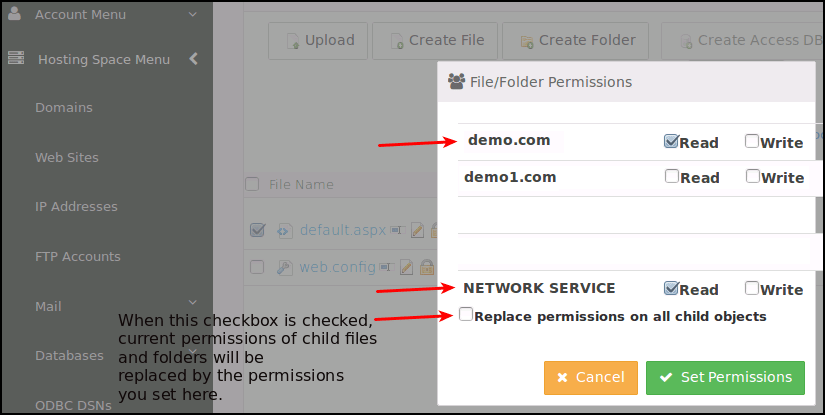
How to assign permissions from SolidCP
Related Articles
Installation and Configuration of SolidCP Control Panel on Windows
Installation and Configuration of SolidCP with Windows OS The following is required in advance: Windows Server (2003 or above) SQL Server (2005 or above) Download and install Web Deploy: http://www.iis.net/downloads/microsoft/web-deploy Download and ...
How to Assign admin roles in Office 365
Assign admin roles to a user in your business Go to the Office 365 admin center. In the Admin center, select Users. On the Active users page, choose the user whose administrator role you want to change. The properties page for the user opens. Next to ...
Set permissions on web folders and files
Set permissions on web folders and files Step 1: Login To Plesk Control Panel. Step 2: Go to Files. Step 3: locate the file or directory for which you want to set access permissions, then click the arrow in the corresponding row, Then Click Change ...
SolidCP SSL Installation
How to install Let's Encrypt SSL Certificate on a Website in Solid CP SSL certificate can be installed on Window 2016 and Window 2012 servers. It will not work with Window 2008 OS. Following are the steps to install the SSL on Solidcp. Important ...
Setting Permissions on Web directories and files in Plesk
Setting Permissions on Web directories and files in Plesk Step 1: Follow the steps to delete any email address 1. Visit the URL http://<your_domain>:8880 and login 2. Go to the files from the top menu section or file manager section for the domain ...