How to create new email id in Zimbra Admin Panel
New email address creation and Increase Mailbox Quota
Create Email address
Step 01:
1. Login to Zimbra admin panel, then click on Manage.

Step 02:
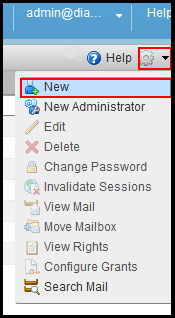
1. Now click on the dropdown list on the left hand side corner of the window and choose New.
Step 03:
1. Choose your Account name and your domain name if you have multiple domain.
2. Put first name in the First name field.
3. Put last name in the Last name field.

Step 04:
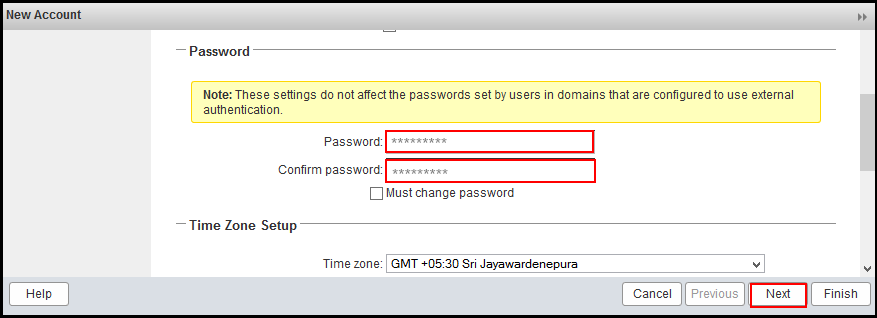
1. Put the password as per your choice then click on Next to reach to Advance tab.
Increase Mailbox quota
Step 01:
1. Double click on the email address whose Mailbox size needs to be increased, now move to the Advance tab and put the desired value in the text field of Account quota(MB) then click on Finish.

In this way you can increase the account quota for a specific user.
Related Articles
Bulk email ID creation on Plesk
Bulk email ID creation on Plesk Follow the below steps to create Bulk Email ID on Plesk 1.Connect to the server via SSH/RDP. 2.Create a file mail.txt using any text editor with a list of mail addresses and passwords for it: example1@example.com ...Email id configure on ipad and iphone.
IPad IPhone Zimbra NE incoming and Outgoing Server Details Email id configure on iPad # Step: 01 1. For configuring email id on ipad, please open the iPad and click on the email icon available at the iPad dock. # Step: 02 2. Now croll down and tap on ...Manage Zimbra Email Services from Client Portal
Manage Zimbra Email Services from Client Portal Quick Navigation Email Account Email Aliases Distribution Lists Domain Aliases Go To Webmail You need to login into your client account at: https://manage.diadem.in/clientarea.php Enter the email ...Manage Zimbra Email Services from Client Portal
Manage Zimbra Email Services from Client Portal Quick Navigation Email Account Email Aliases Distribution Lists Domain Aliases Go To Webmail You need to login into your client account at: https://manage.diadem.in/clientarea.php Enter the email ...How to use Zimbra Connect for 1 to 1 Chat
How to Use Zimbra Connect Chat The following are the steps to initiate 1 to 1 chat with other Zimbra accounts in your domain Below are the following steps to initiate the chat process: Login into Zimbra webmail panel URL: https://zcs.diademtech.in Go ...