How to redirect Website from HTTP to HTTPS in windows hosting
To perform Plesk configuration we need to enable below mentioned options:-
For Updating the Security Mode of Plesk Panel go to Under Security options click on Security Policy
.png)
Once you click on Security Policy.
Select (Allow both secure FTPS and non-secure FTP connections) under FTP usage policy.
Under Password Strength select Medium strength.
.png)
Under Security option Click on Web Application Firewall(ModeSecurity).

For enabling Firewall Click On for enabling Mode security.

Inorder to check if public IP address is configured in plesk as shared IP or not.

Click on the Public Ip address
.png)
Now select the Shared so that IP address can used as shared IP among the hosted application.
.png)
Inorder to Set dedication Application Pool to each subscription, go to Tools and Settings then scroll down and look for Applications and database under which click on IIS appliation Pool.

Then click on Global Settings Tab.

- Select Always assign one application pool to each subscription. Then click ok to finish.

Go to Mail and then Select Mail Server Settings.
.png)
Now beside Maximum message size type 35840 KBytes and under Relay options tick beside SMTP

Scroll down then provide the Ip address along with the mask then click on add button for adding IP address/mask

Under Mail select External SMTP Server.
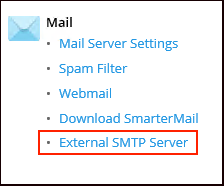
Tick beside Allow Plesk to send email notifications through this SMTP server and also tick beside Use the mail server installed with Plesk and the default and the default mail account created by Plesk.

Now under Plesk select License Management or adding your Plesk License into your Plesk Panel.

Click on Install Key.

Paste the activation code you received, then click ok and your Plesk will be ready to use.

Related Articles
Plesk compatibility mode for legacy option
Plesk compatibility mode for legacy option (Separate SSL/TLS and non-SSL/TLS content) Problem: Opening the website with https shows a default placeholder page as given below: “This is the placeholder for domain <domain name>. If you see this page ...How to enable website URL redirect in IIS
How to enable website URL redirect in IIS Open IIS Manager from Start >> Run >>type inetmgr Expand the server name in the connection pane, then expand the Sites and navigate to the domain. Double-click on Http Redirect option. Mark the check box ...Configuring Windows Sever 2016 for Hosting PHP Web Application.
Configuring Windows Sever 2016 for Hosting PHP Web Application. In order to Run PHP Web based application on Windows server 2016 we need to install below mention application first- Web platform Installer ...How to download website backup using plesk control panel
Steps to download website backup using Plesk Step 1: At first login to the Plesk control panel and click on Website & Domains then select the domain for which you want to take the backup and then go to file manager. Step 2: Select the folder (or ...Automated website copying in Plesk
Automated website copying in Plesk Objective: If you have a production website and are planning major site changes, consider setting up a staging site, a separate location on the server where you can conveniently update and test a copy of the site ...