Install Free Lets Encrypt SSL certificate for your domains and sub-sudomains
Install Free Lets Encrypt SSL Certificate from Plesk
Here we will get to know how to add Let's Encrypt Free SSL certificate for your domains, www and domain aliases hosted on the same server, also how to redirect HTTP to HTTPs.
Step 1: Login to the Plesk panel
For installing Let's Encrypt SSL certificate for domains and sub-domains, go to Website & Domains and then click on SSL/TLS Certificates
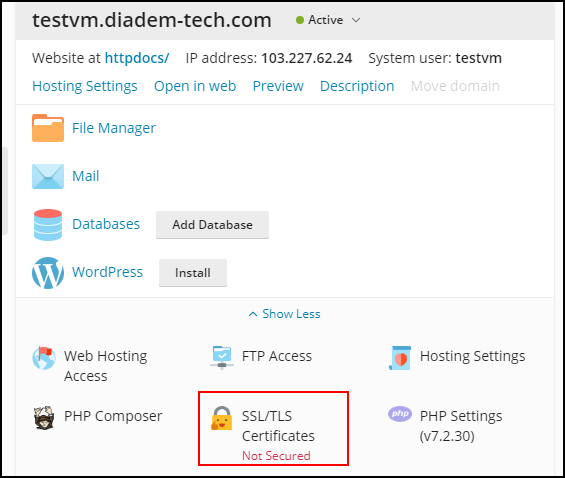
Step 2: Click on Get it free button.
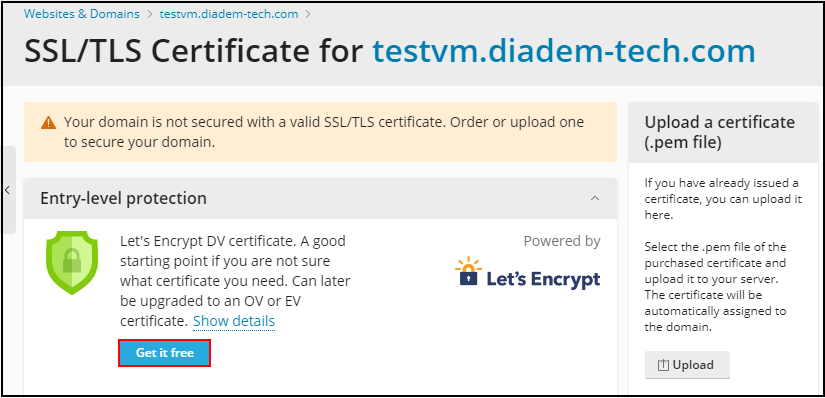
1. Add the email address where you want to send the important notifications regarding the update of the same.
2. Now check the check box beside Include a 'www' for the subdomain and each selected alias.
3. and if you want to secure the webmail then check the check box beside Secure webmail on this domain.
4. Once done further click on Get it Free for successfully installing the SSL certificate.
.png)
Step 3: Redirection from http to https
Once the installation gets completed it will show a message of successful installation of the certificate, now we will be redirecting http to https, click on hosting settings for enabling the re-direction.

To redirect the http to https select the check box for permanent redirection of http to https in the Security section once scroll down to click ok.
.png)
This is how you can enable SSL for the website and increase the security of your website and webmail.
Related Articles
Generate Paid SSL Certificate through Client Portal and Plesk
Generate Paid SSL Certificate through Client Portal and Plesk To generate a certificate from Plesk we can click on generate a new certificate as per the steps below. If CSR is already generated, then go to Step 3. Step 1: For Generating the SSL ...Generate Paid SSL Certificate through Client Portal and Plesk
Generate Paid SSL Certificate through Client Portal and Plesk To generate a certificate from Plesk we can click on generate a new certificate as per the steps below. If CSR is already generated, then go to Step 3. Step 1: For Generating the SSL ...How to generate SSL certificate from CRM Client Panel
Prerequisite: CSR certificate for the domain, either that will be generated and supplied by the client or we can generate the certificate from our end. To generate a certificate from our end we can click on generate a new certificate as per the steps ...Obtaining a Server Certificate from Let's Encrypt Using Certify The Web
Obtaining a Server Certificate from Let's Encrypt Using Certify The Web Certify The Web (a.k.a Certify) is a Let's Encrypt GUI for Windows, allowing you to request, deploy and auto-renew free SSL/TLS certificates from the letsencrypt.org Certificate ...Let's Encrypt installation in CWP
Let's Encrypt installation in CWP Step 1: follow are the steps to install let's encrypt for a domain 1. Visit the URL http://SERVER_IP:2082 and login with your username and password. 2. From the dashboard find Auto SSL under domain and sub-domain ...