MailStore Outlook plugin installation guide
Prerequisites
To start the installation process download outlook Add-in from this link:
Double click on setup file (EmailArchiveOutlookAddinSetup-10.1.0.12426).

Step 1: Click on install

Step 2: Click on next

Step 3: Click on Finish
After installing Mailstore of diadem, “E-MAIL ARCHIVE” tab will be visible in Microsoft Outlook 2013.

Login to MailStore Server
you will be asked to log in to MailStore Server as soon as you click any button in the MailStore Outlook Add-in. Please input server name,username and password .

After given all information click on ok and will appear this screen.

Click yes.
Display of emails in the archive folder
In the MailStore Outlook Add-in, click on Browse Archive to display the part of the archive that is visible to you.
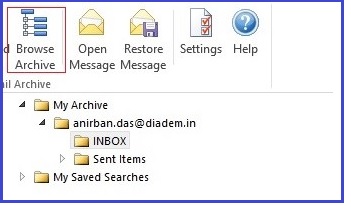
User Archives
The folder My Archive contains all emails that were archived from your mailboxes. If you have read-access to the archives of additional users, their emails are located in the folders labeled Archive of <anirban.das@diadem.in>.

Display of Emails in a Folder
To view the emails of a specific folder, simply click on the folder name. The emails are listed below the tree structure.

Related Articles
Diadem Mailstore Access and User Creation
User Management on Diadem MailStore Creating a New User To create new user first log in to Diadem MailStore using your user name and password. Mailstore Client can be downloaded and installed on the local PC to access the email archive. Click on ...Directly search and retrieve email with Mailstore plugin for Outlook
Restoring Emails To restore an archived email which is no longer in your mailbox to Outlook, please proceed as follows: Download the Mailstore Plugin for Outlook and install on the PC which need to be configured. Locate the email within the archive ...Diadem Mailstore Web Login Access
Mail Store Web Access makes the archive accessible through an internet browser. This way, important functions such as browsing and viewing archived emails can be made available under any system and without having to install additional software. An ...Connect to IMAP server of Diadem MailStore with MS Outlook
Step 1:Go to Outlook File menu choose the option Info then Account Settings again Account settings to reach to the account settings. Step 2:Click on New to create a new account. Step 3:Now choose the option Manual setup or additional server types and ...Export emails from Mailstore to Outlook PST
To export archived emails from Mailstore to Outlook in PST, below steps are to be followed: Assuming that you have already logged in to Mail Store, if you still struck in login please do check the given below link for login to Mail Store: ...