Setting up scheduled Plesk Backups through Backup Manager
How to Set up Scheduled Backup in Backup Manager
Step 1 : Go to Tools & Settings > Backup Manager
.png)
Step 2 : Generally Plesk supports two types of backup:
Full: Each time you create a backup, the backup includes all data regardless of the time when the data was last updated.
Incremental: An incremental backup contains only the data that has changed since the time of the last backup.
You can click on the Backup option to select the type of backup you want as given in the images below and then set and schedule the Backup.


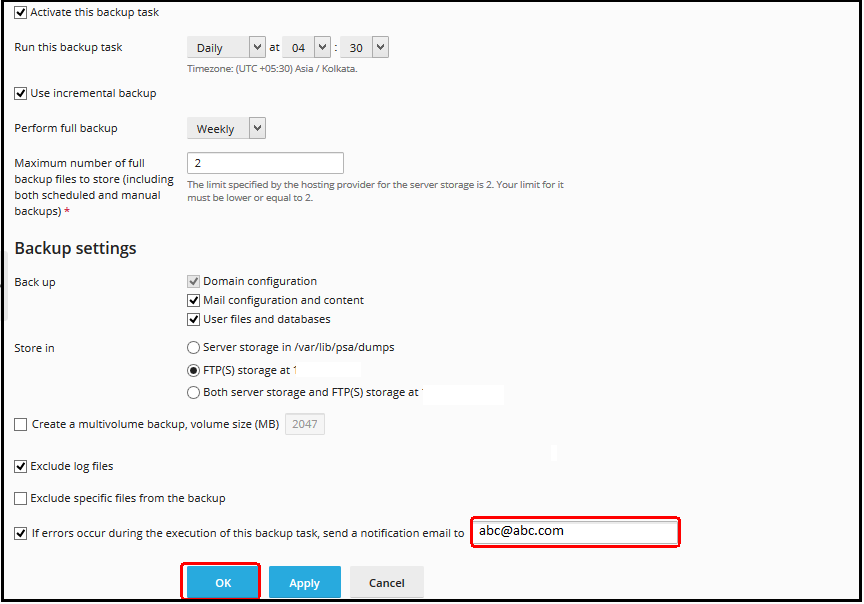
Step 4 : Then go to Settings option to set the Backup procedure according to your need and click on OK.

Step 5 : Then click on the Schedule option to set the Schedule the task after setting up the Backup as given in the image below.
You can set the Time and an email address where all the Backup related data will be sent. The Backup can be set via FTP also. You can go for that option too.
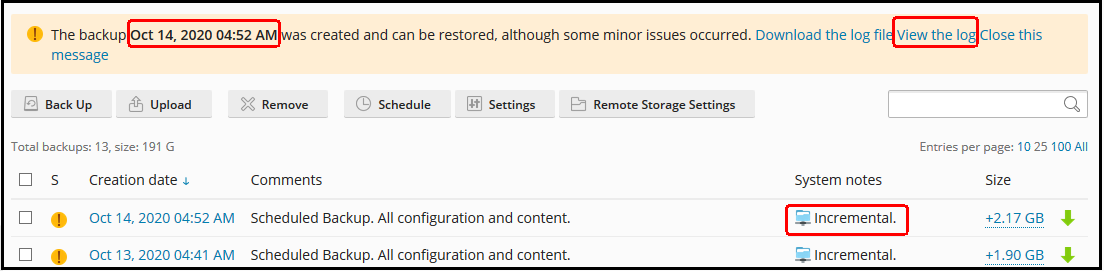
Step 6 : After the Backup is set and done, you can check it as given in the image below with all the details and then click on the View the Log option for further details.
Step 7 : The files and folders that cannot be opened after the Backup can be deleted either in Plesk in the File Manager of that particular domain or from the SSH.

Related Articles
How to download website backup using plesk control panel
Steps to download website backup using Plesk Step 1: At first login to the Plesk control panel and click on Website & Domains then select the domain for which you want to take the backup and then go to file manager. Step 2: Select the folder (or ...cPanel Backup Job monitoring
Cpanel Backup Job monitoring Reference KB on Cpanel Backup log location: https://support.cpanel.net/hc/en-us/articles/4402165344535-Where-are-the-cPanel-Backup-logs Reference KB on Cpanel backup on locally mounted remote filesystem: ...Plesk Subscription-level daily schedule backup
Plesk Subscription-level daily schedule backup How to schedule the backup How to restore the backup How to schedule the backup Step 1: Go to Subscriptions > example.com > Backup & Restore > Schedule. Step 2: Check the Activate backup task checkbox ...Plesk services logs and configuration files
Plesk services logs and configuration files Plesk Logs Error log: /var/log/sw-cp-server/error_log Access log: /var/log/plesk/httpsd_access_log Panel log: /var/log/plesk/panel.log Configuration PHP config on RHEL-based: ...Backup and restore MySQL database with Plesk
Backup and restore MySQL database with Plesk Description: In Plesk, database dumps are created in the SQL format and saved as ZIP archives. If you need to create a dump in another format or to set custom settings for a dump, use the native ...