View website traffic report and site usage details in Plesk
View your website traffic report from Plesk panel
Step 1: Log in to Plesk Panel using the current username and password.
Step 2: Go to the Websites & Domains, click web statistics.
.png)
Step 3: Then click on Web Statistics.

Step 4: A new window will open for website hit report, here is the web site hit report.

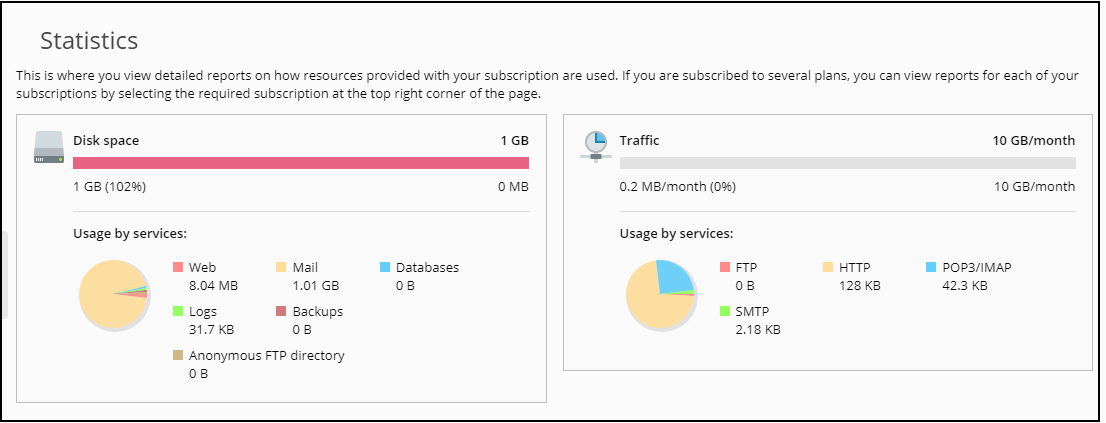
To view your website disk space and traffic consumption details by clicking on the Resource Usage option as given below
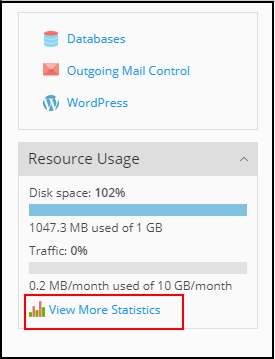
Your current Statistics for your Disk space consumption and Bandwidth consumption are displayed, accordingly, it will help you to manage your hosting services.
Related Articles
How to View the Plesk Website Statistics and Disk space Utilization
How to View the Website Statistics and Disk space Utilization Viewing Statistics from client area Website Statistics Disk Space Utilization Viewing Statistics from client area Step 1: Log in to your client area from https://manage.diadem.in/ and once ...How to View the Plesk Website Statistics and Disk space Utilization
How to View the Website Statistics and Disk space Utilization Viewing Statistics from client area Website Statistics Disk Space Utilization Viewing Statistics from client area Step 1: Log in to your client area from https://manage.diadem.in/ and once ...Plesk compatibility mode for legacy option
Plesk compatibility mode for legacy option (Separate SSL/TLS and non-SSL/TLS content) Problem: Opening the website with https shows a default placeholder page as given below: “This is the placeholder for domain <domain name>. If you see this page ...Important Plesk CLI Commands
Important Plesk Linux CLI Commands If Plesk throws an error, these logs will help. /usr/local/psa/var/log /opt/psa/admin/logs /var/log/sw-cp-server/error_log /usr/local/psa/admin/logs/panel.log /usr/local/psa/admin/logs/httpsd_access_log ...How to download website backup using plesk control panel
Steps to download website backup using Plesk Step 1: At first login to the Plesk control panel and click on Website & Domains then select the domain for which you want to take the backup and then go to file manager. Step 2: Select the folder (or ...