Creating POP3 E-mail account in Mozilla Thunderbird
To configure POP3 E-mail account in the Mozilla Thunderbird go to Tools --> Accounts Settings.
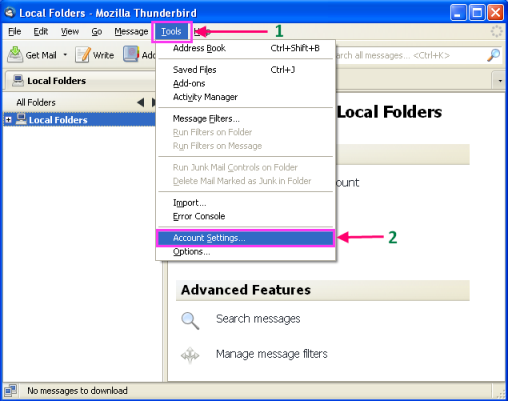
Now click on Account Actions and select Add Mail Account.

After this typed Your Name as your name, then add full E-mail address, typed Password after that check Remember password and click Continue.

Wait for a while a automatic configuration box will appear click Manual Setup on that box.

Select Server Settings from the box in LHS.

Below are the description of numbering sequence.
- Write the server name. E.g. mail.yourdomain.com
- Select the Port 110.
- Typed the user name. E.g. user@yourdomain.com
- Select Connection security None.
Select Outgoing Server(SMTP) and after that click on Edit.


Below are the detail of numbering sequence.
- Typed Description as your Domain Name.
- Write Server Name as mail.yourdomain.com
- Select Port 25.
- Connection security should be None
- Authentication method is set as No authentication.
Click OK to forward.
Please check this details and click OK to close the window.

Related Articles
Creating IMAP E-mail account in Thunderbird
1. To configure Mail Account on Thunderbird, open Thunderbird click on “Tools” over the tab and click “Account Setting” From the drop down menu. (On Linux Ubuntu click on Edit > Account Setting). 2. Click On “Account Actions” and click “Add Mail ...Creating POP3 account in Apple Mail
Run Apple Mail. If you run it for the first time and do not have any mail accounts configured in it, skip the next step: Apple Mail will take you directly to creating one. Open the Adding Mail Account wizard: Click Mail > Preferences.... Select the ...Changing E-mail password through webmail (Horde)
Changing E-mail password through webmail (Horde) Step 1: Follow the steps to change password of your email address from Horde webmail 1. Visit the URL http://webmail.<domain_name> or https://webmail.<domain_name> and login into horde mail. 2. Hover ...Creating Email Auto Reply/ Vacation Mail
Steps to Creating Email Auto Reply/ Vacation Mail Objective: If you are going on vacation and will not be able to check your mail for a while, you may want to leave a vacation notice that will be automatically sent to your correspondents once they ...Outlook 2013 Setup with POP and IMAP3
POP and IMAP email account configuration for Outlook 2013 From the File menu choose the option Info then Account Settings again Account settings to reach to the account settings. Click on New to create a new account. Now choose the option Manual ...