How to install Dependencies for Node.js application
Install websocket modules for nodejs at Plesk server
Step-01: Checking Node.js and npm version:
1. Login to server through SSH using root user.
2. The data directory of the Node.js application at plesk is /opt/plesk/node/<Node.js version>/* directory. By-default three binary version of Node.js (version: 6, 8 and 9) will be install at Plesk.
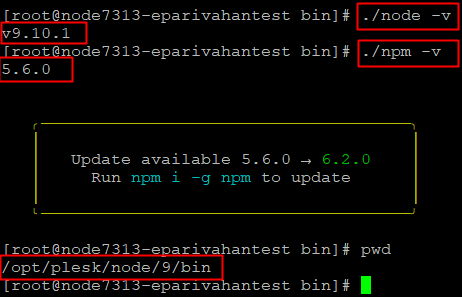
3. Now go to the any version of the Node.js binary directory and we can find the component's version through below as given commands:
- Node.js and npm version:
# cd /opt/plesk/node/<Node.js version>/bin (Example: /opt/plesk/node/9/bin)
# ./node -v
# ./npm -v
Step-02: websocket modules install at Plesk server
1. Now go to the any version of the nodejs binary directory.
# cd /opt/plesk/node/9/bin
2. Then run the below command to install the websocket.
# ./npm install websocket

3. After installation you can check the websocket modules inside the node_modules directory.
Location: /opt/plesk/node/9/bin/node_modules/websocket/

Related Articles
How to enable Node.js Support in Plesk
Install Node.js support at Plesk Onyx through updating the plesk Plesk Onyx offers Node.js support. Node.js is an open-source, cross-platform runtime environment for developing server-side Web applications. Step-01: Installation process 1. Login to ...Running node.js on Localhost
Install Node.js for your platform i.e Windows Type nodejs.org in your browsers address bar, or click the link https://nodejs.org/en/download/ Download the installer and run it. After finishing Installation open a command prompt and type : These ...Enable node.js with IIS
Configuring IIS node.js with Windows Server 2012 Before proceeding further we need to install below mentioned application:- Download Node JS for Window (https://nodejs.org/en/download/). Now for Installing IIS node, search for IIS node on Web ...Deploying node.js in Diadem Express Cloud
we need to login to the Diadem EC control panel, once logged in we can created a new environment. as shown in the below given picture. I have deployed a basic node.js without any load balancing and sql server, in the above picture I have marked the ...Install Redis on Plesk Server
Install Redis on Plesk Centos 7 Server Install Redis on Server Base Enable Redis PHP Extension from Plesk Reference KB: https://bobcares.com/blog/install-redis-on-plesk/ https://supporthost.in/install-redis-on-a-plesk-server/ Install Redis on Server ...