How to set MIME types for web fonts in IIS
Steps to follow to set MIME types in IIS
- .eot application/vnd.ms-fontobject
- .ttf application/octet-stream
- .svg image/svg+xml
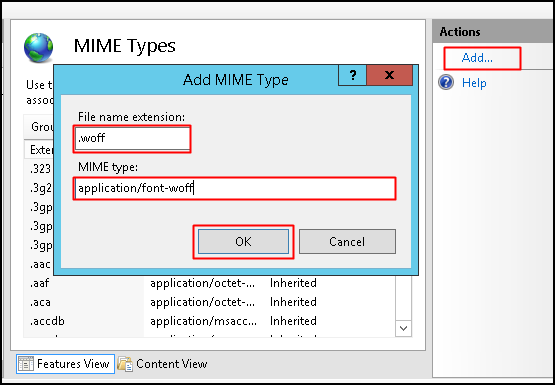
- .woff application/font-woff
- .woff2 application/font-woff2
- Open IIS Manager (Start >> Run >> type inetmgr hit enter).
- Select the root node from the connections pane. Double-click MIME Types from features pane.

- Click on Add link in the Actions pane. This will bring up the dialog box. Enter file extensions, specify corresponding MIME type and click on OK button.
Related Articles
Set permissions on web folders and files
Set permissions on web folders and files Step 1: Login To Plesk Control Panel. Step 2: Go to Files. Step 3: locate the file or directory for which you want to set access permissions, then click the arrow in the corresponding row, Then Click Change ...
How to set periodic recycling for application pool in IIS
Following are the steps to set periodic recycling for the application pool in IIS Login to your VPS via RDP. Click on Start → Administrative Tools → IIS. Expand the server name. Click on Application Pools. Select the application pool in which you ...
How to Add Website in IIS
Steps to follow to add a website in IIS Steps to configured by selecting a folder in Windows Explorer and adding the permission identity to the folder's Access Control List (ACL). Open Windows Explorer > Select the directory under (eg: C:\website) > ...
Enable node.js with IIS
Configuring IIS node.js with Windows Server 2012 Before proceeding further we need to install below mentioned application:- Download Node JS for Window (https://nodejs.org/en/download/). Now for Installing IIS node, search for IIS node on Web ...
Obtaining a Server Certificate from Let's Encrypt Using Certify The Web
Obtaining a Server Certificate from Let's Encrypt Using Certify The Web Certify The Web (a.k.a Certify) is a Let's Encrypt GUI for Windows, allowing you to request, deploy and auto-renew free SSL/TLS certificates from the letsencrypt.org Certificate ...